
What the .NET CLI is
The .NET CLI is the command-line interface for:
- creating solutions/projects,
- restoring NuGet packages,
- building, running, testing,
- publishing apps,
- managing SDKs, tools, workloads, and NuGet configuration.
It works with SDK-style projects (.csproj, .fsproj, .vbproj) and solutions (.sln).
Core Concepts
SDK vs Runtime
- SDK: includes compilers, templates, build tooling. Needed to develop/build.
- Runtime: needed to run built apps.
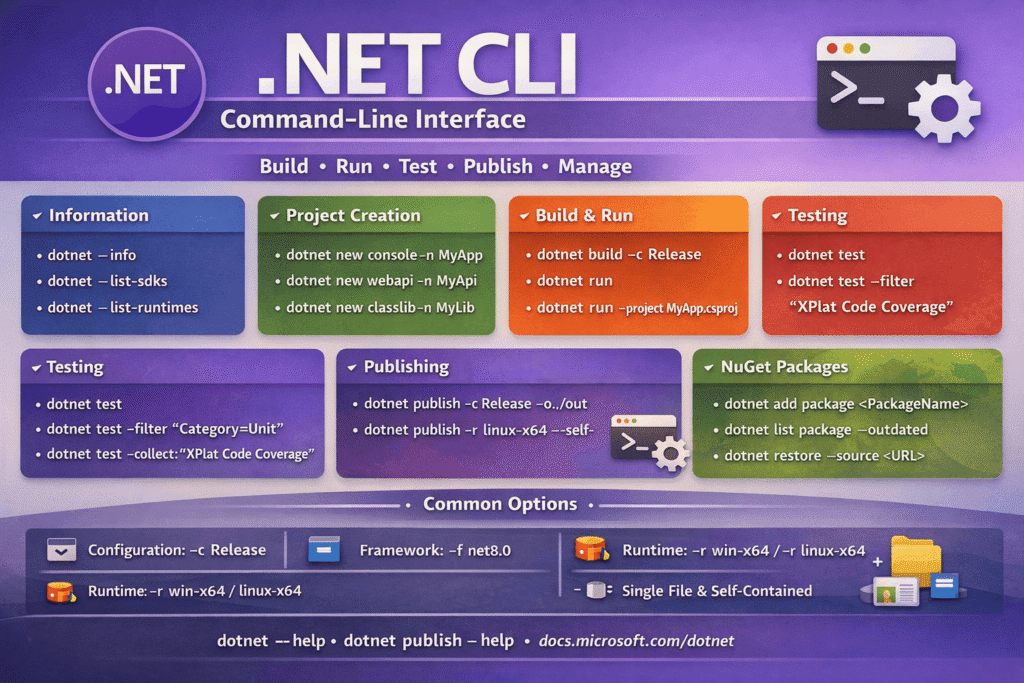
dotnet --info
dotnet --list-sdks
dotnet --list-runtimesSolution vs Project
- Solution (
.sln): container for multiple projects. - Project (
.csproj): build unit producing an output (exe/library).
Project Lifecycle
1) Create
Templates:
dotnet new --list
dotnet new webapi -n MyApi
dotnet new console -n MyApp
dotnet new classlib -n MyLib
dotnet new xunit -n MyApp.Tests2) Restore
Restore NuGet packages declared in project files:
dotnet restoreRestore happens implicitly during build in most cases, but explicit restore is useful in CI.
3) Build
Compiles without running:
dotnet build -c Release4) Run
Builds (if needed) and runs:
dotnet run
dotnet run -c Release
dotnet run --project src/MyApi/MyApi.csproj
dotnet run -- --urls http://localhost:5050Anything after -- goes to your application args.
5) Test
Runs test projects:
dotnet test
dotnet test -c Release
dotnet test --filter "FullyQualifiedName~MyNamespace"
dotnet test --collect:"XPlat Code Coverage"6) Publish
Produces deployable outputs:
dotnet publish -c Release -o ./outCommon publishing knobs:
- Framework:
-f net8.0 - Runtime Identifier (RID):
-r linux-x64,win-x64,osx-arm64 - Self-contained: includes runtime
- Single-file: bundles
- Trimming: reduces size (be careful for reflection-heavy apps)
Example:
dotnet publish -c Release -r linux-x64 --self-contained true -p:PublishSingleFile=true -o ./outSolutions & References
Create and manage a solution
dotnet new sln -n MySolution
dotnet sln MySolution.sln add src/MyApi/MyApi.csproj
dotnet sln MySolution.sln listProject references
dotnet add src/MyApi/MyApi.csproj reference src/MyLib/MyLib.csproj
dotnet remove src/MyApi/MyApi.csproj reference src/MyLib/MyLib.csproj
NuGet Package Management
Add / remove packages
dotnet add package Serilog
dotnet add package Microsoft.EntityFrameworkCore --version 8.0.0
dotnet remove package SerilogList packages (including transitive)
dotnet list package
dotnet list package --include-transitive
dotnet list package --outdated
dotnet list package --vulnerableRestore with a specific source
dotnet restore --source https://api.nuget.org/v3/index.jsonNuGet configuration:
- project/solution level:
NuGet.config - user level:
~/.nuget/NuGet/NuGet.Config
Build Configuration & MSBuild Properties
Configuration, framework, verbosity
dotnet build -c Debug
dotnet build -c Release
dotnet build -f net8.0
dotnet build -v minimal # quiet|minimal|normal|detailed|diagPassing MSBuild properties
dotnet build -p:Version=1.2.3
dotnet publish -p:PublishTrimmed=true
Common useful properties
Version,AssemblyVersion,FileVersionTreatWarningsAsErrors=trueNoWarn=CS1591ContinuousIntegrationBuild=true(good for CI)
SDK Pinning with global.json
Pin the repo to a specific SDK:
{
  "sdk": {
    "version": "8.0.204",
    "rollForward": "latestFeature"
  }
}
Create it quickly:
dotnet new globaljson --sdk-version 8.0.204Tools (Local & Global)
Install and run tools
dotnet tool install --global dotnet-ef
dotnet tool update --global dotnet-ef
dotnet tool list --globalLocal (repo-scoped) tools:
dotnet new tool-manifest
dotnet tool install dotnet-ef
dotnet tool restore
dotnet tool run dotnet-ef -- --versionWorkloads (Mobile, WebAssembly, etc.)
Workloads are SDK add-ons (MAUI, WASM, etc.):
dotnet workload search maui
dotnet workload install maui
dotnet workload list
dotnet workload updateFormatting & Code Style
dotnet format
dotnet format --verify-no-changesUser Secrets (Dev-only config)
For local development secrets (ASP.NET Core):
dotnet user-secrets init
dotnet user-secrets set "ConnectionStrings:Default" "Server=...;"
dotnet user-secrets listDiagnostics & Help
dotnet --help
dotnet build --help
dotnet msbuild -version
dotnet --diagnostics